
Workspaces are coming: shared projects, assets, and credits for your whole team

Follow along
Video

Two frames in. The move between them out.

Give it a first frame and a last frame, pick a style, and get the shot that carries one into the other.

Real output

Two frames in, the motion between them out

The first and last frame are what you supply. Everything in the middle is what the chosen style generates.

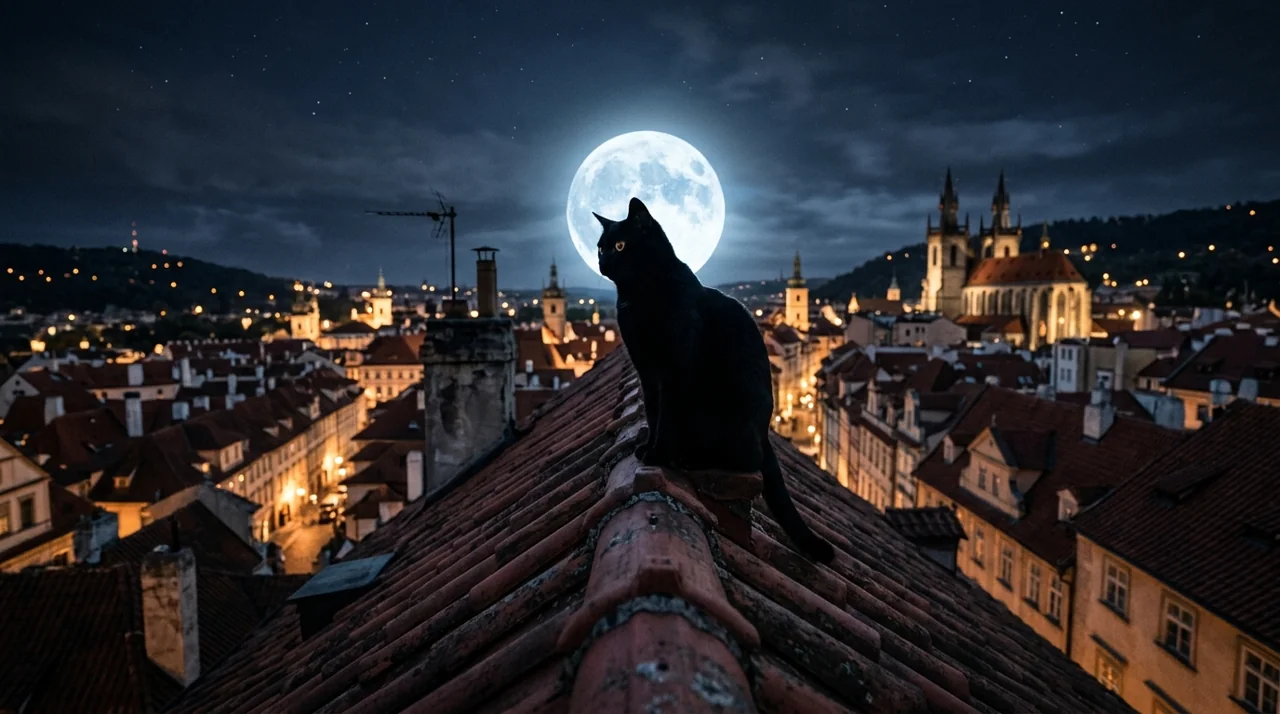
A cat on a rooftop, then a cat on a windowsill — First frame
First frame
A cat on a rooftop, then a cat on a windowsill — Last frame
Last frame
Generated clip

A cat on a rooftop, then a cat on a windowsill

The same black cat at both ends — sitting on a moonlit roof, then asleep in the morning sun. Raven Transition scatters it into a flock and flies the flock into the next room, where it settles back into the cat.

Effect
Raven Transition
Length
5 seconds
One bottle, from the coast to the jungle — First frame
First frame
One bottle, from the coast to the jungle — Last frame
Last frame
Generated clip

One bottle, from the coast to the jungle

A product shot moved between two sets without a reshoot. Water Bending lifts ribbons of water around the bottle and washes the sea ledge away, and the same bottle is left standing on a mossy rock by a waterfall.

Effect
Water Bending
Length
5 seconds
How it works

Two frames, a style, and the length of the move

01

Upload a first frame

An image or a video. If you upload a clip, its frame is taken as the starting point.

02

Upload a last frame

Where the transition has to land. The model's whole job is getting from one to the other.

03

Choose a style

Twenty-three named presets — Raven Transition, Morph, Air Bending, Shadow Smoke and the rest. The style you pick is the prompt.

04

Set the length

Five or ten seconds, at 215 credits per second. Render, and the clip is back in two to five minutes.

Inputs and outputs

What Transitions takes, and what it returns

What Transitions needs from you

First frame
An image or a video upload
Last frame
An image or a video upload
Style
One of 23 named presets
Typical run time
2–5 minutes

Export specifications

Resolution
1080p
Lengths
5 or 10 seconds
Delivery
Rendered clip in your workspace library, re-openable from the History drawer
Rights
You own the outputs, to the extent they can be owned, and may use them commercially — see the Terms
What you can control

The style is the prompt

There is no free-text prompt field here. Picking a style is how you direct the shot, which is why there are twenty-three of them rather than three.

  • First frame

    Image or video

    The starting point. A video upload contributes its frame rather than its motion.

  • Last frame

    Image or video

    The landing point. The generated motion is fitted between the two.

  • Style preset

    23 named presets

    Raven Transition, Morph, Air Bending, Shadow Smoke, Water Bending, Firelava, Flying Cam Transition, Melt, Splash, Flame, Smoke, Logo Transform, Hand Transition, Column Wipe, Hole Transition, Display Transition, Jump, Seamless, Trucksition, Gorilla Transfer, Intermission, Stranger Transition and Earth Wave. The chosen style is passed as the prompt — there is no separate prompt field.

  • Duration

    5 or 10 seconds

    Two values only, not a range. Defaults to 5, and at 215 credits per second that is 1,075 credits against 2,150 for ten.

Engine choice

Two ways to run it. Pick the one that matches your source.

  • Default

    5 seconds

    The default length, 1,075 credits. Enough for a cut between two beats.

    Edit-to-edit transitions

  • Longer

    10 seconds

    Twice the runway at 2,150 credits, for a move that needs to breathe.

    Title cards and set-piece reveals

Who it's for

Built for editors who need the shot between two shots

  1. Video editors

    Bridge two clips that were never meant to sit together, without a hard cut.

  2. Social creators

    Give a sequence of stills the movement that keeps a viewer through the scroll.

  3. Motion designers

    Get a first pass at a transition in minutes rather than keyframing it.

One product. Pick your volume.

Built for Growth at Every Stage

Every plan includes every model and every feature. Plans only change how many credits you get and how many generations run at once.

Pro

Occasional projects

₹2,900/month

Get Started

Credits per month

60,000

≈1,000 images or ≈12 videos


At once

6 parallel generations

Max

Daily production

₹5,900/month

Get Started

Credits per month

150,000

≈2,700 images or ≈30 videos


At once

8 parallel generations

Ultimate

High-volume

₹9,900/month

Get Started

Credits per month

260,000

≈4,700 images or ≈55 videos


At once

10 parallel generations

Enterprise

Teams & agencies

₹1,00,000+/month

Contact Us

Credits per month

Custom volume

≈10,000 images or ≈1,000 videos


At once

Custom concurrency

  • Credits refresh monthly
  • Top-up additional credits anytime
  • Unused credits don't roll over

Not ready for the commitment?

Pay as you go

Free to sign up. Buy credits when you need them, same models, same features as every plan above.

Buy Credits

Credit packages

15 credits per ₹ 1

You pay You get
₹ 500 7,500 credits
₹ 1,000 15,000 credits
₹ 2,000 30,000 credits

FAQ

Frequently asked questions

Everything you need to know about Transitions on BeHooked.

Where do I type the prompt?

You do not. The style preset you choose is the prompt — that is the whole reason there are twenty-three of them rather than a text box.

How long can a transition be?

Five seconds or ten seconds. Those are the only two values the app accepts, not the ends of a range, and it defaults to five.

Can I use video files as the frames?

Yes. Both the first and last frame accept an image or a video upload; a clip contributes its frame as the endpoint.

What does a transition cost?

215 credits per second at 1080p — 1,075 for a five-second move and 2,150 for a ten-second one. The figure is on the button before you commit, and failed runs are refunded.

How long does it take?

Roughly two to five minutes for either length. The clip lands in your library and stays re-openable from the History drawer.

Pick two frames and a style

Experience Transitions and every specialized AI app in your workspace.

Try Transitions